
I/O
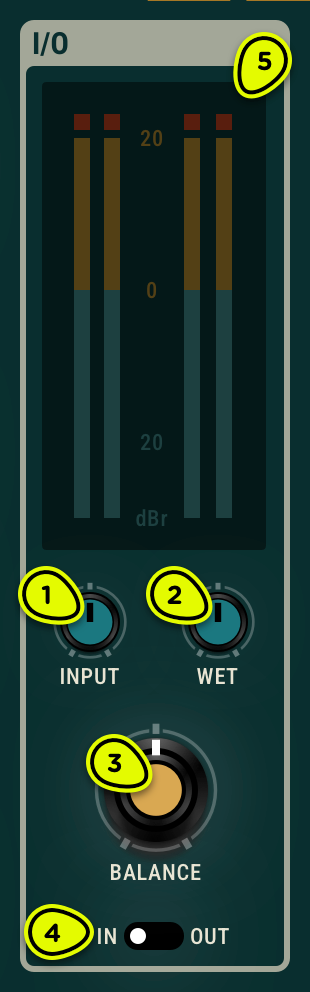
- Input knob Adjusts the gain applied on the input signal. Presets will work best when the input is around 0 dB on the level meter.
- Wet knob Adjusts the gain applied to the wet/processed signal.
- Balance knob Sets the relative amount of wet and dry signal.
- In/Out switch Determines if the input signal is sent into the effect or not.
- Level meters Display RMS levels for the left and right channels for both the input and output of the plug-in.
Overview ⚓︎
The I/O module provides metering, dry/wet mixing, and gain adjustments for the input and wet signal coming in and out of the plug-in.
Controls ⚓︎
Input knob ⚓︎
The Input knob adjusts the gain applied to the plug-in’s incoming signal. For best results with the Objeq Delay 2 factory presets, make sure that the average input is around 0 dB on the level meter.
Note that presets exclude the position of the Input knob.
Wet knob ⚓︎
The Wet knob adjusts the gain of the processed signal. The gain displayed in dB varies from -∞ (no output signal) in its leftmost position to 20 dB in its rightmost position.
Balance knob ⚓︎
The Balance knob controls the relative amount of wet and dry signal. In its middle position, there is an equal amount of wet and dry signal. Turning the knob anti-clockwise reduces the amount of wet signal in the mix while keeping the amount of dry signal unchanged. The amplitude of wet signal is gradually reduced as the knob is turned to the left until it reaches a value of zero in its leftmost position resulting in a mix with only dry signal. Starting from the middle position of the Balance knob and turning it clockwise has a similar effect but on the dry signal. As the knob is turned to the right, the amount of dry signal in the mix is reduced while keeping the level of wet signal unchanged. When the knob is in its rightmost position, there is no dry signal in the mix and the output signal only has wet signal.
In/Out switch ⚓︎
The In/Out switch determines if the input signal is sent into the effect or not. In its right position (out), the input signal is sent directly to the output without going through the effect. When the switch is in its left position (in), the input signal is sent into the effect. Note that this switch is different from a bypass control. Indeed, if the effect is already active when the switch is turned to its out position, the input will be directed to the output but remaining echoes in the effect will be heard.
Level meters ⚓︎
The level meter allows one to monitor peak and RMS (root means square) level of the left (L) and right (R) output channels from the synthesizer. As a limiter is located at the output of Objeq Delay, it is important to make sure that the amplitude of the signal remains within values that ensure that no distortion is introduced in the signal at the output.
The sss mark on the level meter has been adjusted to correspond to -20 dBFS (full scale). This means that at that level, the signal is -20 dB below the maximum allowed value. This 0 dB level mark should typically correspond to playing at mezzo forte (moderately loud) level. This ensures a headroom of 20 dB which should be more than enough to cover the dynamics of most playing situations and therefore guarantee that no additional distortion is added in the output signal.
A peak value mark allows one to follow the maximum level values reached by the output signal. The limiter is triggered when this mark enters the red zone of the level meter (17 dB) and it remains active while the side vertical bars at the top of the lever meter are switched on.