
Filter
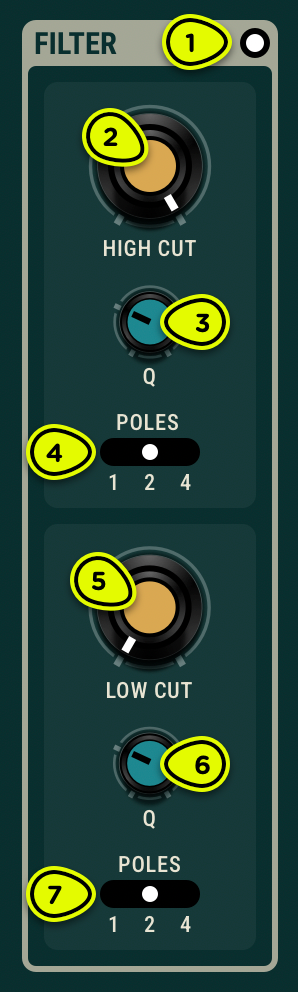
- Bypass switch Puts the Filter in and out of the processed signal’s path.
- High-cut knob Sets the frequency of the low-pass filter.
- Q knob Sets the quality factor, or resonance.
- Poles selector Sets the steepness of the filter slope. Values of 1, 2, and 4 map to 6, 12, and 24 dB/oct slopes respectively.
- Low-cut knob Sets the frequency of the high-pass filter.
- Q knob Sets the quality factor, or resonance.
- Poles selector Sets the steepness of the filter slope. Values of 1, 2, and 4 map to 6, 12, and 24 dB/oct slopes respectively.
Overview ⚓︎
In addition to the acoustic filtering from the Objeq module, low- and high-cut filters offer further tone shaping options. The High Cut and Low Cut knobs set the cut-off frequency which ranges from 20 Hz to 20 kHz. The Q knob sets the quality factor or resonance of the response. High values lead to more resonance. The Poles parameters set the frequency response’s steepness. The 1, 2, and 4 values correspond to a first order (-6 dB/octave), second order (-12 dB/octave), or fourth order (-24 dB/octave) filter respectively.
Usage ⚓︎
This filter is useful to control how the object reacts to the input signal providing additional tonal control. The filter limits the amplitude of low and high frequencies coming out of the object. For example, turning the Low Cut knob clockwise increases the cutoff frequency of the low-cut filter resulting in a less boomy sound. Turning the knob further will make the object sound more and more metallic because its spectrum then becomes dominated by high frequencies.