Delay
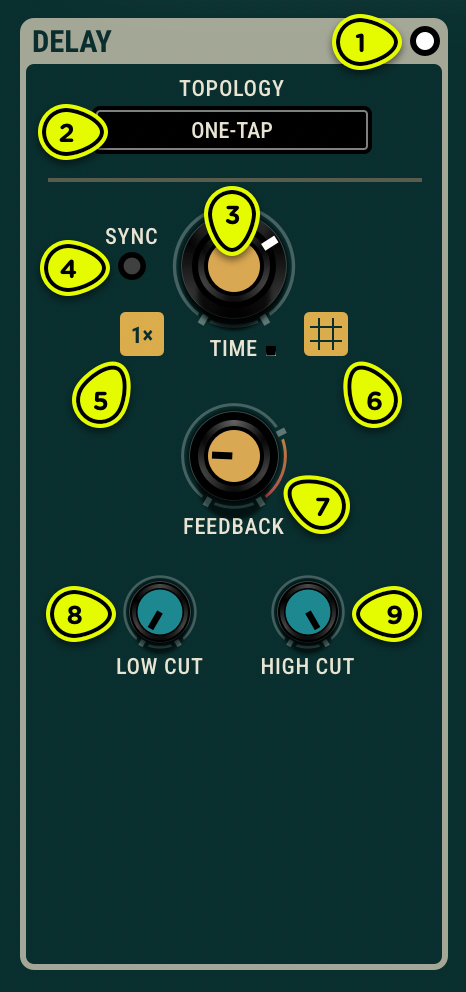
- Bypass switch Puts the Delay in and out of the processed signal's path.
- Topology selector Selects the delay's internal configuration.
- Time knob Sets the delay time, from 1 ms to 8 s.
- Sync switch Links the delay time to the host tempo; see Synchronisation, note divisions, and multiplier.
- Multiplier button Shows the current time multiplier value and brings up the time options panel.
- Grid button Brings up the time options panel.
- Feedback knob Adjusts the gain applied to the feedback signal.
- Low Cut knob Sets the cutoff frequency of a low-cut (high-pass) filter applied to the feedback signal.
- High Cut knob Sets the cutoff frequency of a high-cut (low-pass) filter applied to the feedback signal.
Overview ⚓︎
The Delay module provides flexible echo and time-based effects with four distinct topologies. From simple stereo delay to complex multi-tap configurations, each topology offers a different approach to rhythmic and spatial processing. The feedback path includes low-cut and high-cut filters for shaping successive repeats, and delay times can be synchronized to the host tempo.
Topologies ⚓︎
The Delay module for Objeq Delay 2 offers four configurations, each with varying complexity and features. These options provide convenient choices for creative delay needs, including simple delay, stereo field manipulation, beat mangling, and clustering.
One-Tap ⚓︎
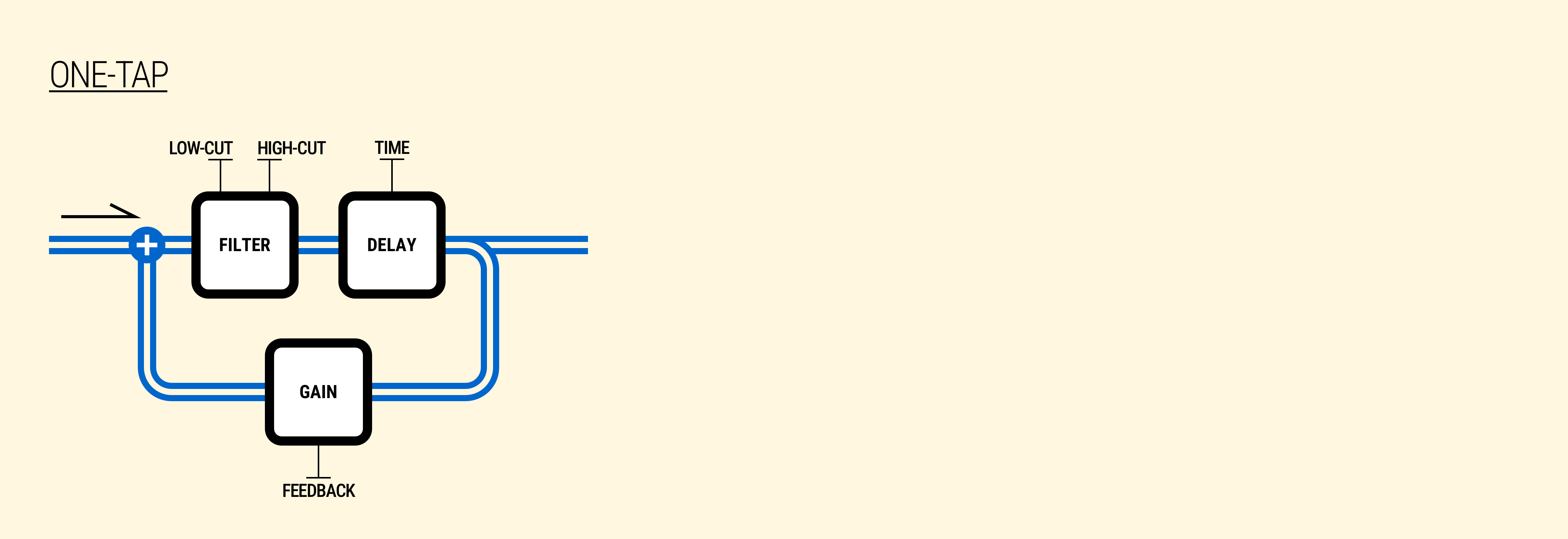
The One-Tap topology proposes the simplest configuration. It preserves stereo information and gets the job done quick.
The following diagram illustrates the internal configuration of the One-tap topology.
Two-Tap ⚓︎
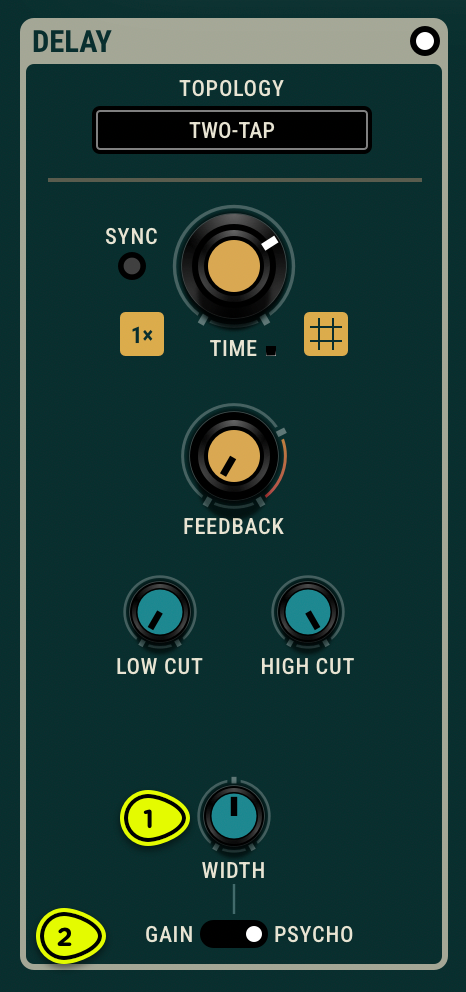
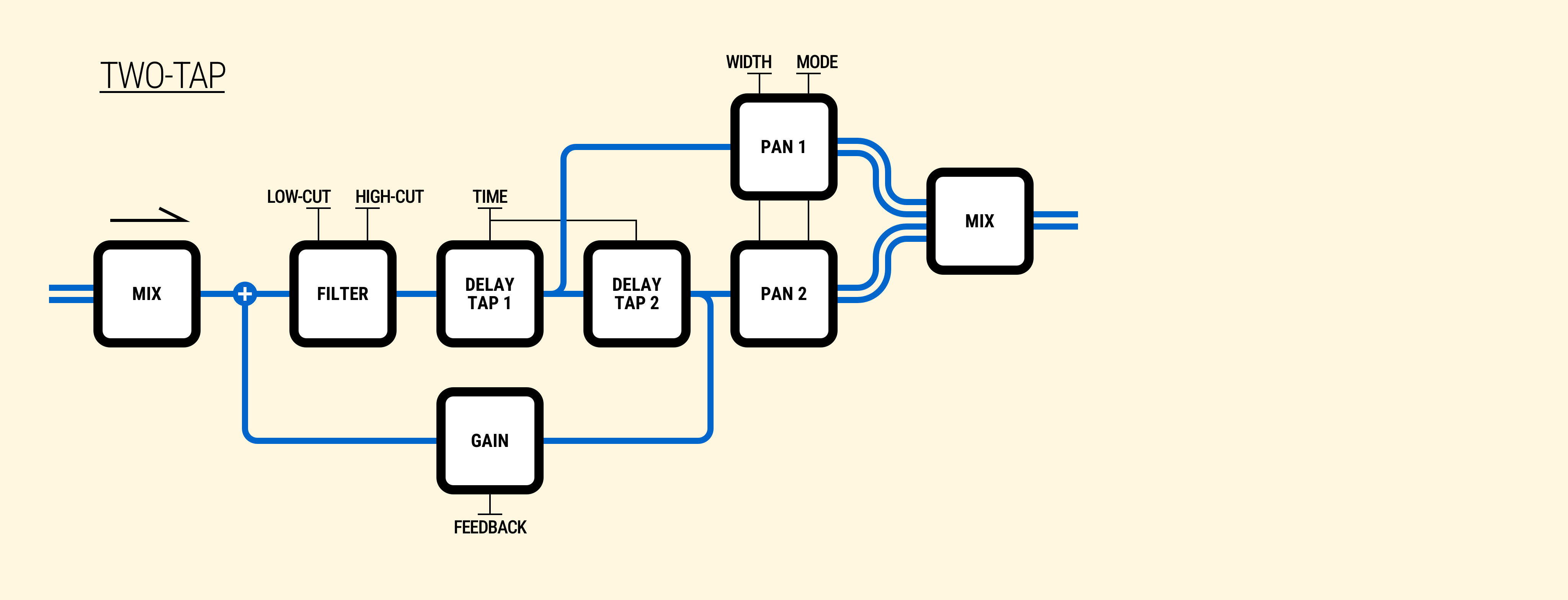
- Width knob Places the delayed signal into the stereo stage with repeats alternating sides.
- Mode switch Selects between gain and psychoacoustic mode.
The Two-tap topology features two delay stages controlled by the same Time parameter. The Width parameter spreads each tapped stage output into the stereo field. This parameter drives two pan modules, as shown in the diagram below, which operate in two modes: gain mode, which mimics a regular pan-pot, and psychoacoustic mode, which uses delays and filters to simulate the arrival times and filtering characteristics of an idealized head model.
The following diagram illustrates the internal configuration of the Two-tap topology.
Four-Tap ⚓︎
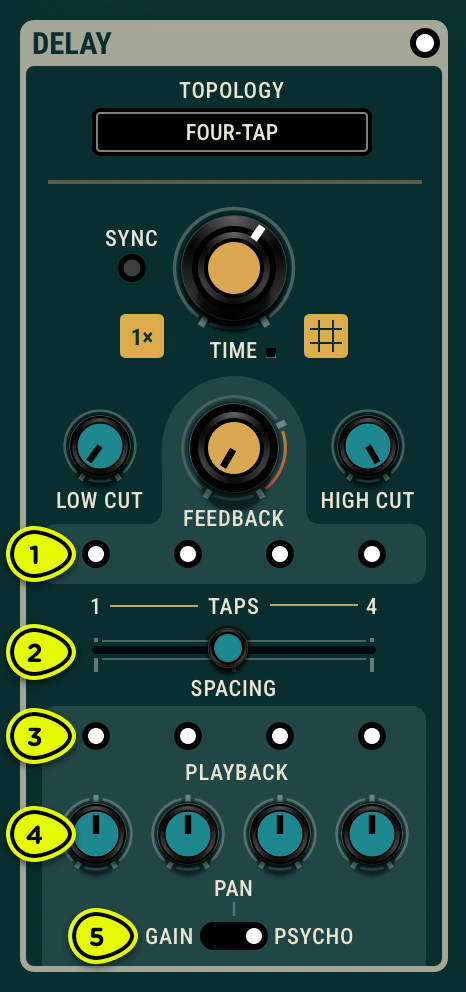
- Feedback Taps switches Toggles on and off each feedback tap.
- Spacing knob Reduces (to the left) or increases (to the right) the delay times of taps 2–4. In the middle, all taps share the same delay time.
- Playback Taps switches Toggles on and off each playback tap.
- Pan knobs Place each playback tap into the stereo sound stage.
- Pan Mode switch Selects between gain and psychoacoustic mode.
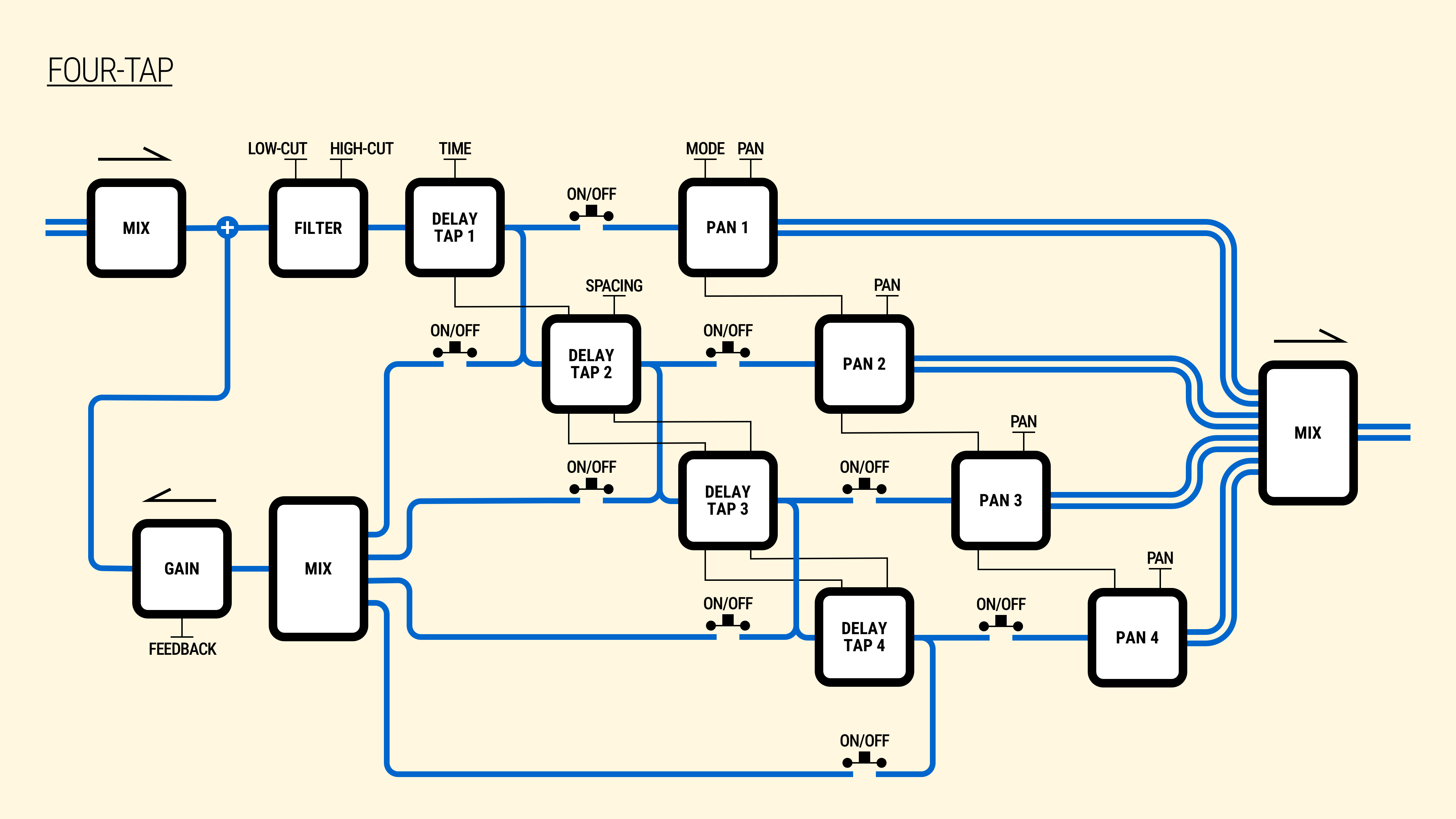
The Four-tap topology features four delay stages, all controlled by the Time parameter, but altered independently (taps 2–4) by the Spacing parameter.
The Spacing parameter adjusts the delay times of taps 2–4 relative to the first tap. At centre, all four taps share the same delay time set by the Time parameter. Moving Spacing to the right increases the delay times progressively, while turning it to the left decreases them.
The spacing applies proportionally across the taps: tap 2 receives 10% of the spacing amount, tap 3 receives 20%, and tap 4 receives 40%. This creates an expanding or contracting rhythmic pattern between the taps while tap 1 remains anchored to the base Time value.
Tapping the output of each stage allows each signal to be placed into the stereo stage independently via the Pan parameters.
The following diagram illustrates the internal configuration of the Four-tap topology.
Split ⚓︎
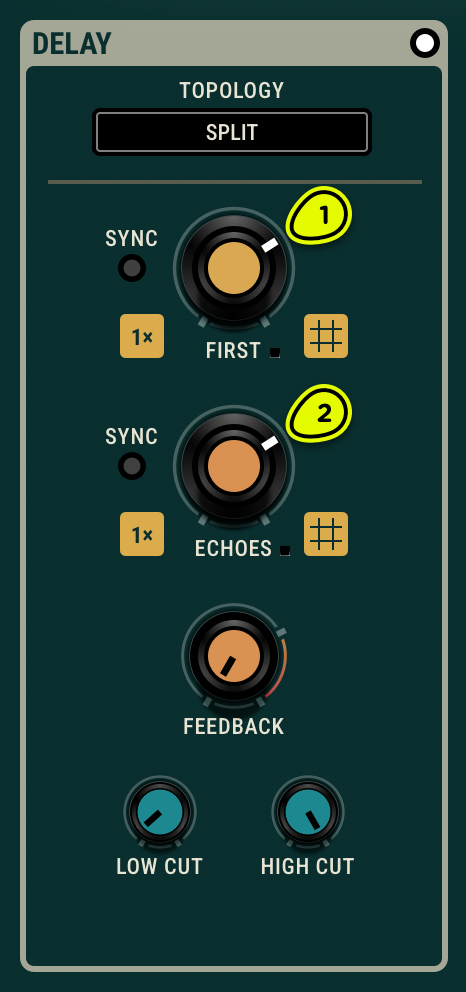
- First knob Sets the delay time for the first stage, controlling the initial pre-delay before the echoes begin.
- Echoes knob Sets the delay time for the second stage, controlling the spacing between successive repeats.
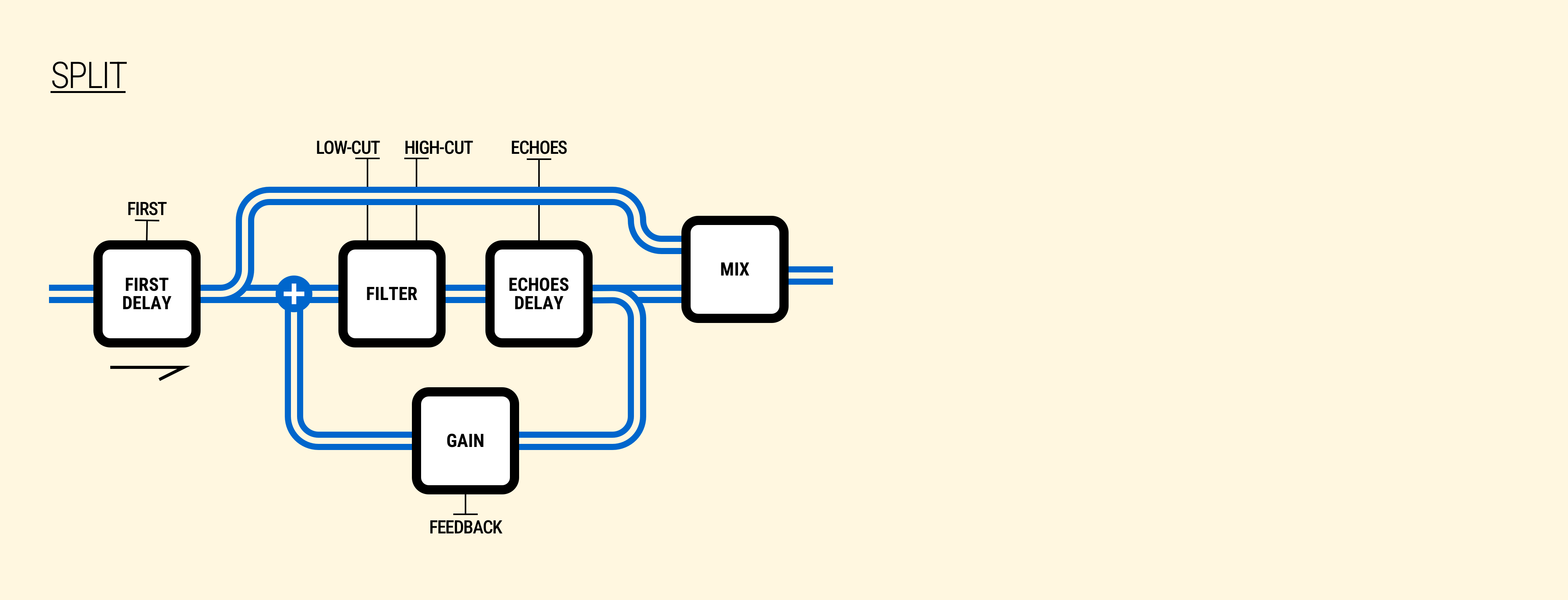
The Split topology features two delay stages in series, each with its own time parameter. The First delay sets the initial pre-delay—the time before the first echo is heard. The Echoes delay controls the spacing of subsequent repeats. This separation allows for effects like a long initial delay followed by rapid echoes, or a short slapback leading into spaced-out repeats.
As shown in the diagram below, the feedback loop wraps around the Echoes stage only, so the First delay acts as a one-shot pre-delay while the Echoes stage generates the repeating pattern.
The following diagram illustrates the internal configuration of the Split topology.