
Modulator 1/2
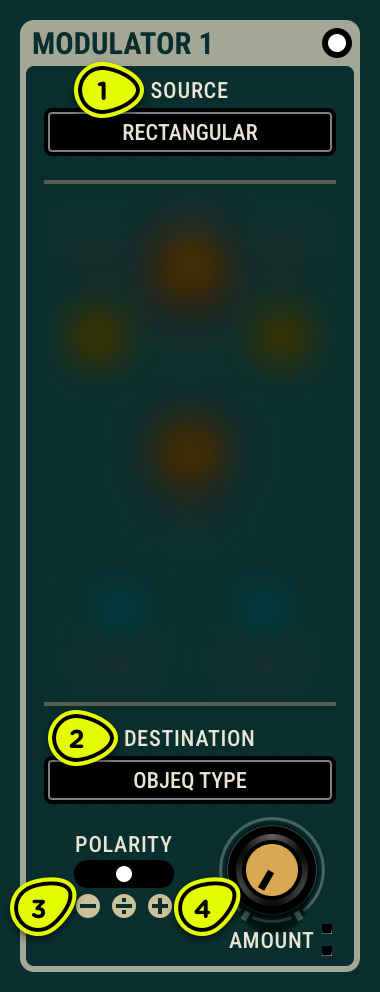
- Source menu Selects the source of control signal—LFOs (Low Frequency Oscillator) as well as RMS (Root Mean Square), envelope follower, or pitch detection computed from the audio input signal.
- Destination menu Selects the parameter to modulate.
- Polarity switch Sets the control signal to positive-only, negative-only, or bipolar.
- Amount knob Sets the quantity of modulation sent to the destination.
Overview ⚓︎
Modulator 1 and Modulator 2 offer a comprehensive selection of control voltage sources applicable to various destinations. Most of these destinations correspond to the visual parameters of Objeq Delay 2; the others map to internal parts of the patch.
Sources ⚓︎
Sources include rectangular, triangular, and sine LFOs, as well as RMS, envelope follower, and monophonic pitch detection. The following sections present more details for each.
Rectangular, Triangular, and Sine LFOs ⚓︎
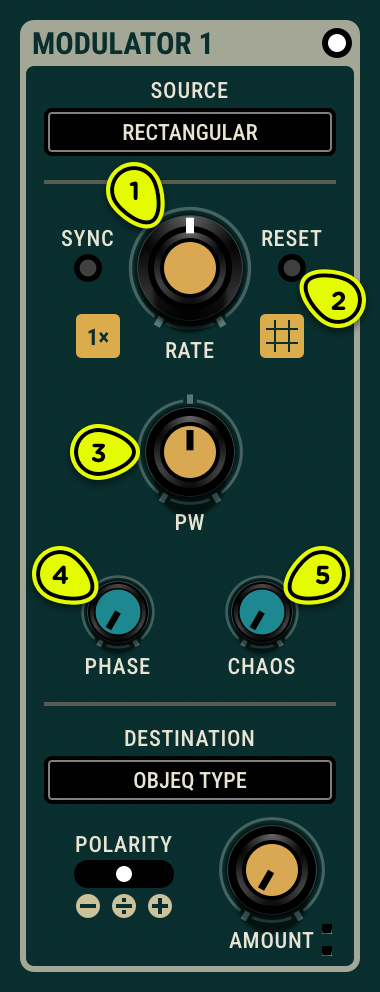
- Rate knob Sets the LFO frequency. When Sync is enabled, the rate follows the host tempo proportionally; see Synchronisation for details.
- Reset switch Restarts the LFO at the phase position.
- PW knob Sets the duty cycle of the rectangular output, and skews the waveform of the sine and triangular outputs.
- Phase knob Sets the starting point of the waveform when Reset is clicked, expressed as a percentage of one cycle.
- Chaos knob Randomizes the amplitude range of the waveform, adding unpredictability to the modulation.
The Rectangular, Triangular, and Sine LFOs generate classic periodic waveforms for rhythmic modulation effects. The Rate knob can be synchronized to the host tempo, making it easy to create tempo-locked effects like tremolo, filter sweeps, or panning patterns. The Chaos knob adds controlled randomness—fully clockwise, the rectangular wave produces a classic sample-and-hold effect.
- Despite its name, the PW knob affects all three waveforms, not just the rectangular pulse—it skews the midpoint of the triangular and sine waves as well. At 0% or 100%, the triangular wave becomes a sawtooth.
RMS ⚓︎
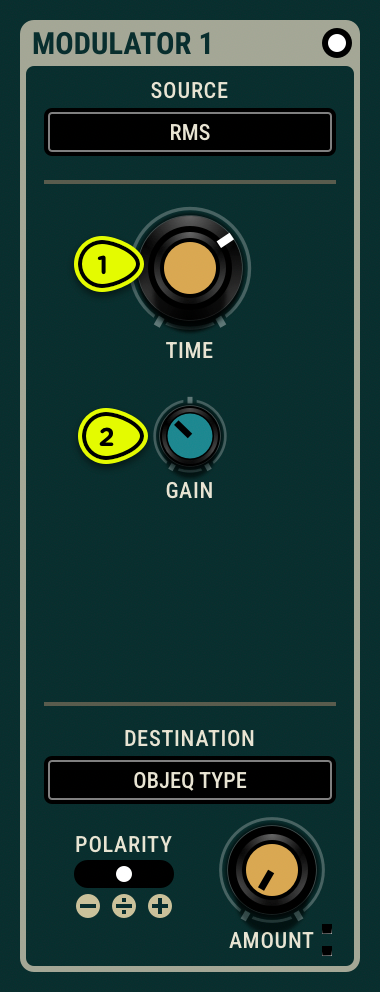
- Time knob Sets the averaging window for the RMS calculation. Longer times produce a more stable output; shorter times react more quickly to level changes.
- Gain knob Scales the amplitude of the RMS output signal.
RMS (Root Mean Square) generates a control signal based on the perceived loudness of the audio input. It provides a smooth envelope that responds to the overall energy of the signal rather than individual transients. This makes it well suited for compressor-style ducking effects or subtle, gradual modulation that follows the dynamics of the input material.
Envelope Follower ⚓︎
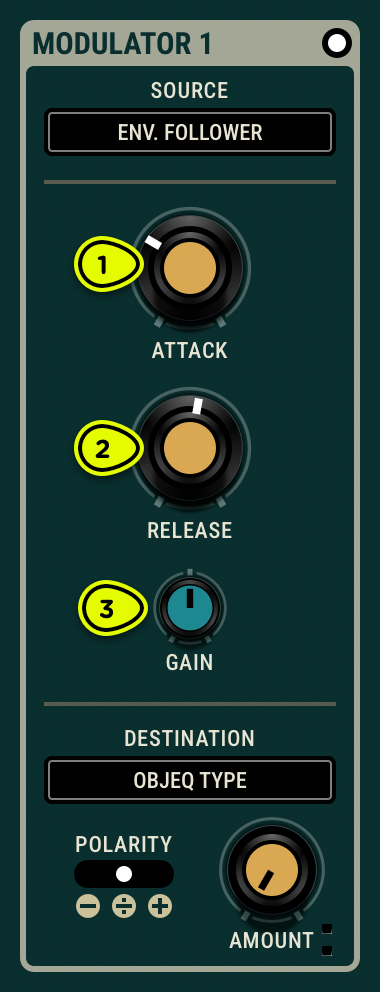
- Attack knob Sets the envelope follower reaction time on attack.
- Release knob Sets the envelope follower reaction time on release.
- Gain knob Scales the amplitude of the envelope output signal.
The Envelope Follower generates a control signal by tracking the peak amplitude of the audio input. Compared to RMS, it produces a more dynamic envelope that closely follows the contour of the source, making it ideal for auto-wah effects, dynamic filtering, or amplitude-driven modulation. For best results, set the release time longer than the attack time to avoid unwanted noise in the output.
Pitch ⚓︎
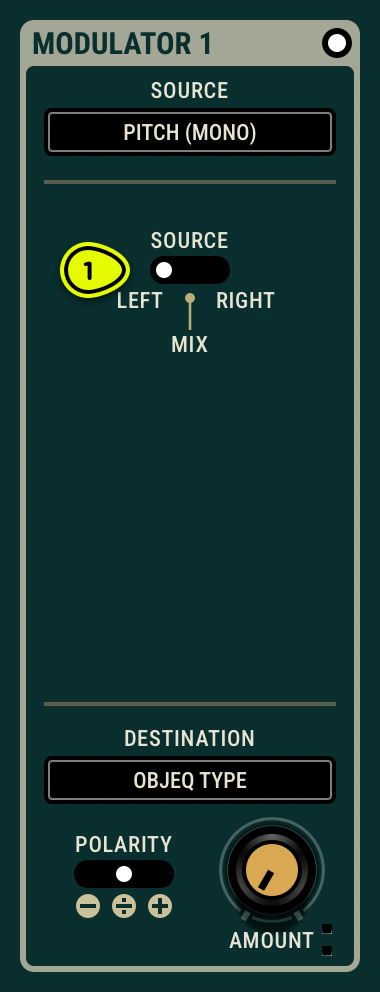
- Source switch Selects the input channel for pitch detection: left, right, or a mix of both.
The Pitch source detects the fundamental frequency of the audio input and converts it to a control signal. This allows modulation destinations to follow the pitch of the incoming audio—for example, tuning the Objeq frequency to track a melody. For optimal results, the input should be monophonic and relatively dry; reverb, chorus, and polyphonic content can interfere with accurate detection.
Destinations ⚓︎
The Destination menu routes the modulation signal to one of the parameters below. Delay destinations vary by topology: OT = One-Tap, TT = Two-Tap, FT = Four-Tap, SP = Split.
Input ⚓︎
- Input Trim VCA
Delay ⚓︎
- Delay Time (OT, TT, FT)
- Delay First Time (SP)
- Delay Echoes Time (SP)
- Delay Spacing (FT)
- Delay Width (TT)
- Delay Feedback (OT, TT, FT, SP)
- Delay Low-Cut (OT, TT, FT, SP)
- Delay High-Cut (OT, TT, FT, SP)
Objeq ⚓︎
- Objeq Type
- Objeq Frequency
- Objeq Decay
- Objeq Material
- Objeq Formant
Filter ⚓︎
- Filter High-Cut Cutoff
- Filter High-Cut Q
- Filter Low-Cut Cutoff
- Filter Low-Cut Q
Mixer and output ⚓︎
- Mixer Wet VCA
- Mixer Balance
- Output Trim VCA