
Synchronisation, note divisions, and multiplier
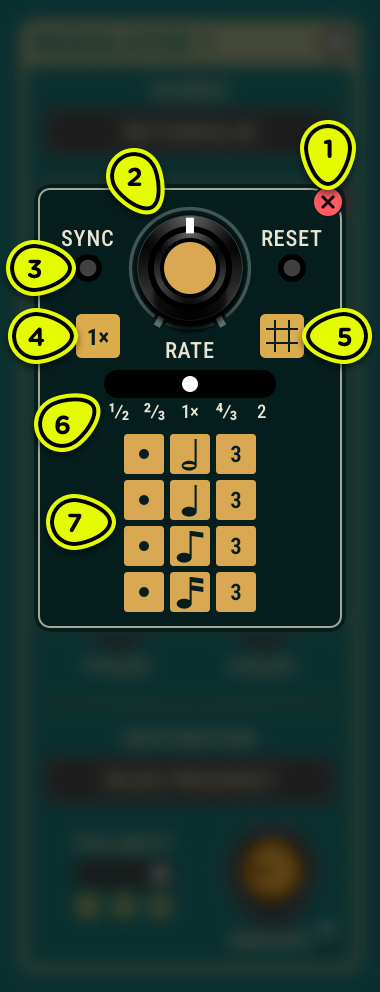
- Close button Closes the extended panel.
- Rate knob Sets the base rate or time value.
- Sync button Toggles host tempo synchronisation.
- Multiplier button Displays the current multiplier and closes the extended panel.
- Grid button Closes the extended panel.
- Multiplier scale Scales the rate (or time) by a factor.
- Note divisions Selects a rhythmic value from whole to sixteenth note, with dotted and triplet variants.
Overview ⚓︎
Rate and time parameters throughout Objeq Delay 2 can synchronise to the host tempo, keeping delay times and LFO rates locked to the beat. The extended panel—shared by all syncable parameters—provides note divisions and a multiplier for precise rhythmic control.
Synchronisation ⚓︎
The Sync button provides a quick way to lock a parameter to the host tempo. When you click Sync, three things happen at once:
- Host synchronisation activates, the parameter now follows the DAW’s (Digital Audio Workstation) tempo.
- The extended panel opens, revealing note divisions and the multiplier scale.
- The closest note division to the current free-running value is selected, and the knob moves to match.
Clicking Sync again disables host synchronisation and returns the knob to an equivalent free-running value.
When synchronised, the rate or time modulates proportionally with tempo changes in the host—speeding up or slowing down to stay on the beat.
Note divisions ⚓︎
The grid offers five note values, each with dotted and triplet variants:
| Dotted | Plain | Triplet |
|---|---|---|
| Dotted whole | Whole | Whole triplet |
| Dotted half | Half | Half triplet |
| Dotted quarter | Quarter | Quarter triplet |
| Dotted eighth | Eighth | Eighth triplet |
| Dotted sixteenth | Sixteenth | Sixteenth triplet |
Dotted notes add half the original duration; for instance, a dotted quarter equals a quarter plus an eighth. Triplets divide the beat into three equal parts.
Multiplier ⚓︎
The multiplier scales the rate or time by the selected factor, whether free-running or synchronised:
- 1/2 halves the duration, e.g. a quarter becomes an eighth note.
- 2/3 triplet of the current value.
- 1/1 no change (default).
- 4/3 triplet of twice the current value, e.g. a quarter becomes a half-note triplet.
- 2/1 doubles the duration, e.g. a quarter becomes a half note.
The multiplier value always appears beside the parameter knob, providing a quick reference even when the extended panel is closed.
- The multiplier can reach note values beyond the grid. For example, a whole note is a half note with a 2 multiplier; a thirty-second note is a sixteenth with a ½ multiplier.
- Mapping the multiplier to a host automation parameter allows rapid switching between musically related rates during performance or mixing.