
Architecture and signal flow
Signal flow basics ⚓︎
The figure below presents the general signal flow which follows the general layout of the user interface.
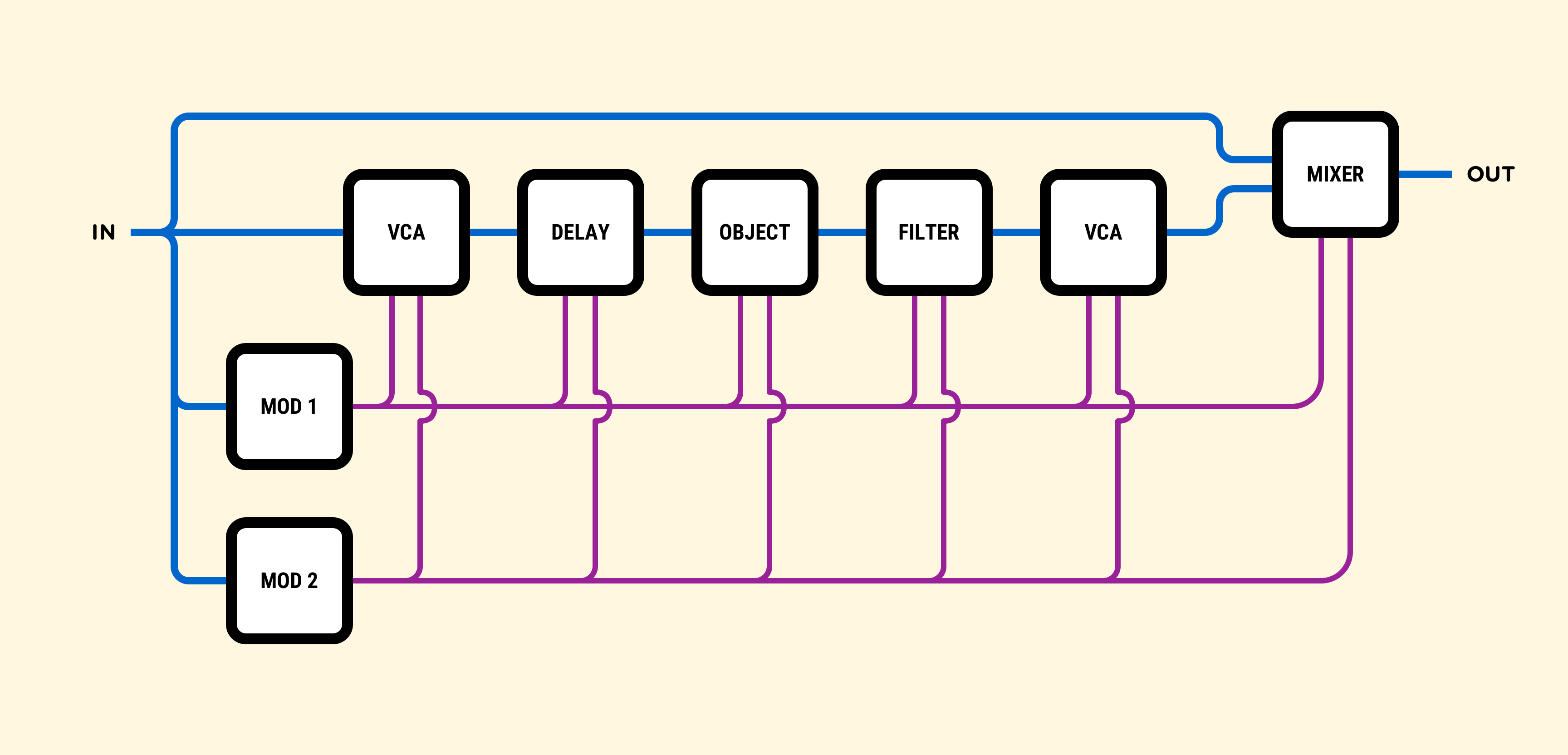
The pair of VCAs at the beginning and end of the patch controls the signal’s amplitude via the modulators (MOD 1 and MOD 2 above).
The Modulator 1 and 2 modules provides a selection of control signal (LFOs, RMS, envelope followers, and pitch) used to automate the parameters of the other modules; the Modulator 1/2 section of this manual gives further details on the available options.
After the first VCA, the signal hits the Delay module which offers four internal configuration: One-, Two-, and Four-tap as well as Split; the Delay section of this manual gives further details about these topologies.
Following the Delay, the signal goes into the Objeq module which acts as a resonant filter modeling various acoustic objects—string, plate, drumhead, beam, and marimba. These objects combined with their easily adjustable parameters offer a fantastic range of tones.
The signal follows through the Filter module which helps finalize the tone shaping with a low- and high-pass filter.
Finally, the I/O module provides metering, dry/wet mixing, and gain adjustments for the input and wet signal coming in and out of the plug-in.